How to Butterfly Click: 14-22 CPS Guide (2026)
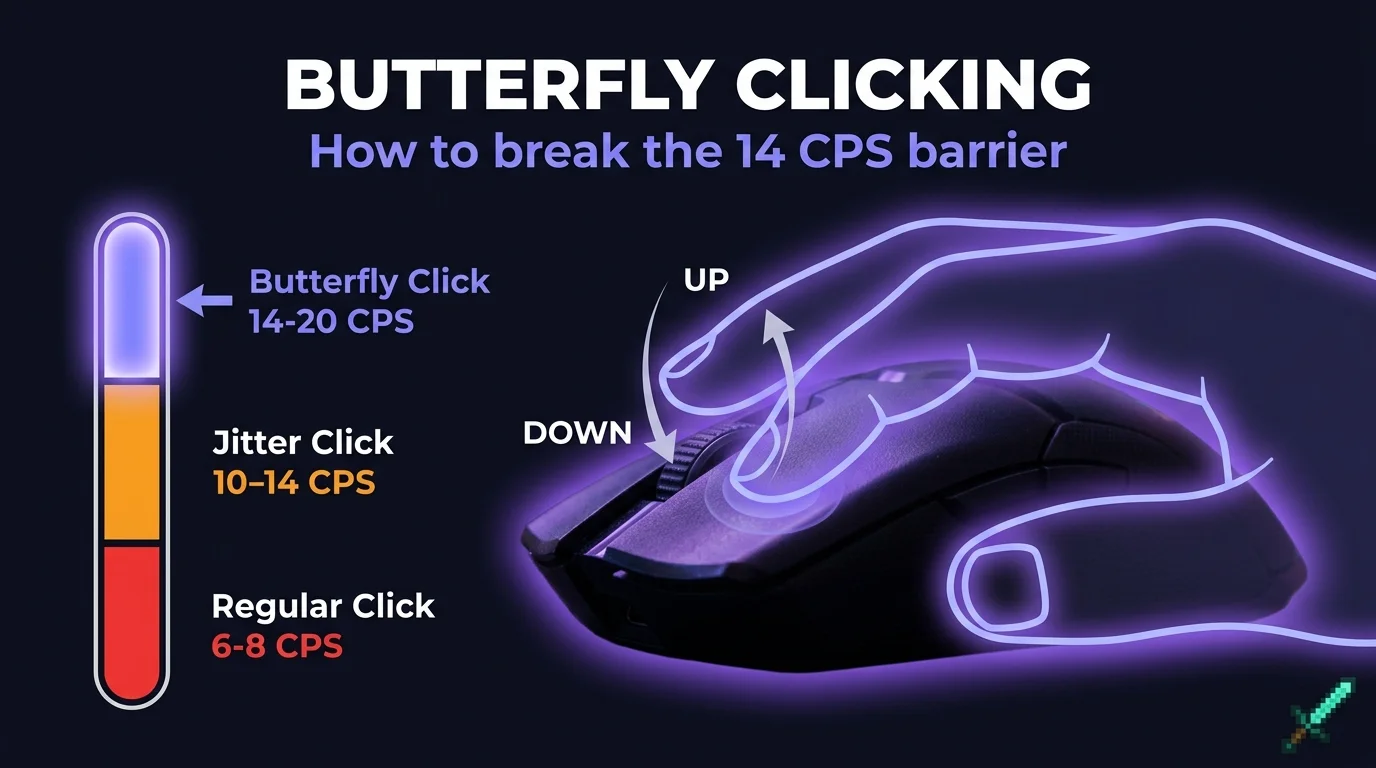
Jitter clicking gets you 10-14 CPS by tensing one arm. Butterfly clicking gets you 14-20 CPS by using two fingers alternating on the same button. Same mouse. Same hand. Nearly double the output. Here is exactly how to do it.
What Is Butterfly Clicking?
The butterfly clicking technique places your index and middle fingers on the same mouse button. They alternate: when one presses down, the other comes up. Each finger registers a separate click, which is what gives you double the output from the same hardware.
Unlike jitter clicking, which uses forearm vibration to fire the button in rapid succession, butterfly clicking is deliberate alternating finger motion. Your forearm stays still. Your wrist stays still. Only two fingers move.
Butterfly clicking was first popularized in Minecraft PvP because it bypasses the natural delay between consecutive clicks from a single finger. It exploits the fact that two separate fingers can trigger the same button faster than one finger can reset. That is the whole trick.
How to Butterfly Click: Step by Step
Step 1: Place your mouse so your index and middle fingers both rest naturally on the left mouse button. Your index finger should sit at the front third of the button, middle finger just behind it.
Step 2: Press down with your index finger, then as it releases, press your middle finger. Not at the same time. Alternating. Think of it like tapping a desk with two fingers in a steady rhythm.
Step 3: Start slow at 6-8 alternating clicks per finger per second. That gives you 12-16 total CPS. Build speed only after the rhythm is consistent.
Step 4: Keep your wrist completely still. All movement comes from the two fingers. This is what makes butterfly clicking more sustainable than jitter clicking, and what separates players who get it from players who just spam.
Step 5: Practice in 15-20 minute sessions maximum. Your fingers will fatigue quickly at first. The muscle memory builds over one to two weeks of daily practice.
What CPS Can You Expect?
A lot of tutorials promise 20+ CPS from day one. That is not how it works.
| Stage | Typical CPS | What It Feels Like |
|---|---|---|
| Just starting | 8-12 CPS | Inconsistent rhythm |
| 1 week practice | 12-16 CPS | Rhythm forming |
| Comfortable with it | 15-18 CPS | Natural and sustainable |
| Advanced | 18-22 CPS | Requires mouse with light switches |
Most players plateau around 16-18 CPS. Getting above 20 CPS consistently requires a mouse with light tactile switches like the Logitech G Pro or Razer Viper. The hardware ceiling is real, and technique alone will not break it.
Butterfly Click vs Jitter Click — Which Is Better?
Both techniques exist for the same reason: more CPS in Minecraft PvP. But they trade off differently.
| Factor | Butterfly Click | Jitter Click |
|---|---|---|
| Max CPS | 14-22 CPS | 10-14 CPS |
| Wrist strain | Low | Medium |
| Aim while clicking | Harder | Easier |
| Learning time | 1-2 weeks | 2-3 weeks |
| Mouse wear | Higher | Medium |
The honest tradeoff: butterfly clicking gives higher CPS but makes aiming harder. Two fingers on the button reduce your grip stability. Your reaction time does not matter if you cannot land shots consistently.
In sword fights, butterfly clicking wins on CPS. In bow fights or any situation that needs precision aim, jitter clicking or regular clicking is better. There is also drag clicking, which can push even higher CPS numbers but requires a different technique entirely.
For beginners in Minecraft PvP, butterfly clicking is the better starting point. Lower strain risk, faster to learn, and the CPS ceiling is more than enough for most competitive servers.
Is Butterfly Clicking Allowed in Minecraft Servers?
It depends on the server. Most servers allow butterfly clicking but some anti-cheat systems flag the dual-finger input pattern as suspicious. Competitive PvP servers often set explicit CPS caps at 16 or detect unusually fast inputs. Check your server rules before using it in competitive play.
Always check the specific server rules before using butterfly clicking in competitive matches. Getting flagged for legitimate high-CPS clicking is frustrating but avoidable. The technique is not cheating. It is a learned physical skill using standard hardware. But the server sets its own rules.
Frequently Asked Questions
Does butterfly clicking damage your mouse?
More than regular clicking, yes. The double impact on the same button at high speed accelerates switch wear. Budget mice may develop double-click issues within months of regular butterfly clicking. Gaming mice with optical switches are more durable for this technique.
What is the best mouse for butterfly clicking?
Any mouse with a light, responsive left click switch works well. Popular choices among Minecraft PvP players include the Logitech G Pro X Superlight, Razer Viper Mini, and Glorious Model O. The key is light actuation force. Heavy switches make alternating fingers much harder.
Can you butterfly click on any mouse?
Yes, but results vary. Heavy switches make it harder to alternate quickly. If your mouse requires significant force to click, you will hit a lower CPS ceiling. A mouse with 45-60g actuation force is ideal for butterfly clicking.
How long does it take to learn butterfly clicking?
Most players get the basic rhythm within a few sessions. Getting consistent 14+ CPS takes one to two weeks of daily 15-minute practice. The technique clicks into place suddenly. Most people notice a big jump around day 7-10.
Is butterfly clicking cheating in Minecraft?
No. Butterfly clicking is a legitimate physical technique using standard mouse hardware. It requires real skill and practice. Some servers have CPS limits to level the playing field, but the technique itself is not cheating. It is a learned skill like any other.
You have the technique. The only way to know if it is working is to see the number. Measure your butterfly click CPS and track your improvement over time.
Free, no signup, results in seconds.
Take the CPS Test